
















































































Lightning to HDMI Adapter with Lightning Port for Apple Devices Connect to Television or Monitor with HDMI Cable White Design
You already have the maximum available quantity in your cart.

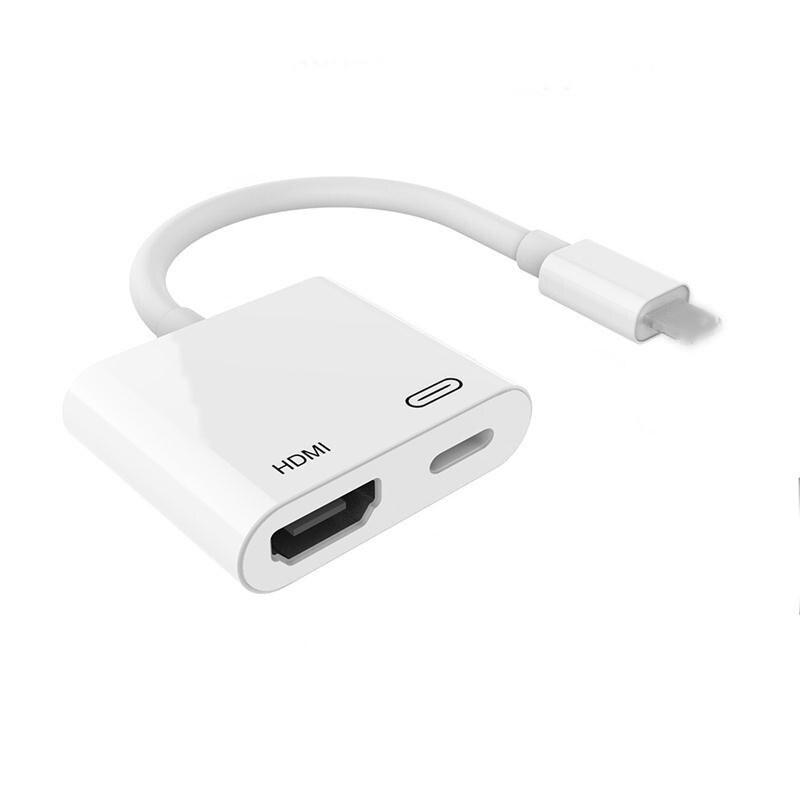
This adapter allows you to connect Apple devices with a Lightning connector to a television, monitor or projector. You plug a standard HDMI cable into the adapter and connect the other end to the HDMI input on the television or monitor. This provides HDMI output even for devices that only have a Lightning connector. Next to the HDMI port, the adapter also features a Lightning port. The adapter is in a white design and connects to the device with a short cable.
- HDMI Output — plug a standard HDMI cable into the HDMI port and connect the device to a television, monitor or projector. You can then view the image on a larger screen than the device's display offers. The port is marked with the HDMI label on the body of the adapter.
- Lightning Port — next to the HDMI output, you will find the Lightning port, into which you can plug a cable with a Lightning connector. It is marked with its own symbol, making it easy to distinguish between the two ports.
- Compatibility — the adapter is designed for Apple devices with a Lightning connector. The short cable ends with a Lightning connector that you insert directly into the device. The body of the adapter can then rest beside the device.
- Connection — plug the HDMI cable into the adapter and into an available HDMI input on the television or monitor. Then insert the adapter connector into the device. Finally, select the input on the television to which you connected the cable.
- Compact Body — the adapter is small and can easily be stored in a bag along with the HDMI cable. You can keep it handy at home or on the go.
- Package Contents — 1x Lightning to HDMI and Lightning adapter. HDMI cable is not included.
The Lightning to HDMI adapter is a simple way to connect Apple devices to a television, monitor or projector. You will then see the image from the device on a large screen. In addition to the HDMI output, you also have a Lightning port available. Thanks to its compact body, you can always have it with you.

Seller: DRAIGER
Dispatched within 1 working day (Mon–Fri) – orders paid for by 14:00 Irish time are processed on the same working day.
Availability: In stock
Transit: 5–13 working days – transit takes place on working days (Mon–Fri).
In total, please allow 5–14 working days from payment of your order.
Delivery is only possible to addresses in Ireland.
Delivery to address: €1.59
Returns
Deadline: 30 days from receipt of the goods, without giving any reason
How: notify us of your withdrawal at info@lunzo.ie and send the goods by post to the returns address:
Rotonda Rene Descartes, Parcela 101 – Nave 3
28070 Alcala de Henares, Madrid
Spain
Once you have sent the parcel, send us the proof of dispatch with the tracking number to info@lunzo.ie – this lets us process your return as quickly as possible and refund you without waiting for the parcel to arrive.
Product condition: you can also return goods that have been used or unpacked, or that no longer have their original packaging or tags
Costs: you pay the postage for sending the goods back to Spain; we charge no return fee
Refund: within 14 days of receiving your notice of withdrawal; we may withhold the refund until the goods have arrived back or until you provide proof that you have sent them
Exchanges
Deadline: 30 days from receiving your parcel (exchange for a different size, colour or variant)
How: write to us at info@lunzo.ie, giving your order number and the variant you want – once we have checked that it is available, we will send you instructions for the exchange, including the address to which you should send the original item
Costs: you pay to send the original item back; the new variant will be sent to you at no further charge
Faulty or damaged goods
Period for claiming a fault: up to six years from delivery of the goods – within the first 30 days you can reject a faulty product and ask for a full refund, and for the first 12 months a fault is presumed to have been present on delivery
How: write to us at info@lunzo.ie and attach a photograph or a video of the goods – in most cases you do not have to send the goods back
Remedies: a replacement with a new item, a reasonable price reduction, or a refund of the full purchase price
You will find the details in Delivery and Payment, Returns and Exchanges, Faulty Goods.
Seller:
Guiyang Jingdong Co., Ltd.
Address: Guiyang Jingdong E-commerce Industrial Park, Jinhua Town, Guanshanhu District, Guiyang, Guizhou, 550000, China
E-mail: 15290806785@163.com
Telephone: +86 177 1986 9388
Manufacturer:
Guiyang Jingdong Co., Ltd.
Address: Guiyang Jingdong E-commerce Industrial Park, Jinhua Town, Guanshanhu District, Guiyang, Guizhou, 550000, China
E-mail: 15290806785@163.com
Telephone: +86 177 1986 9388
EU responsible person:
TULIPWAYS CO LTD
Address: 10 Rue Greneta, 75003 Paris, France
E-mail: eushiduo@shi-duo.top
Telephone: +33 7 73 19 06 09